Project 2
Entra ID Lab
Architecture
Overview
What was built
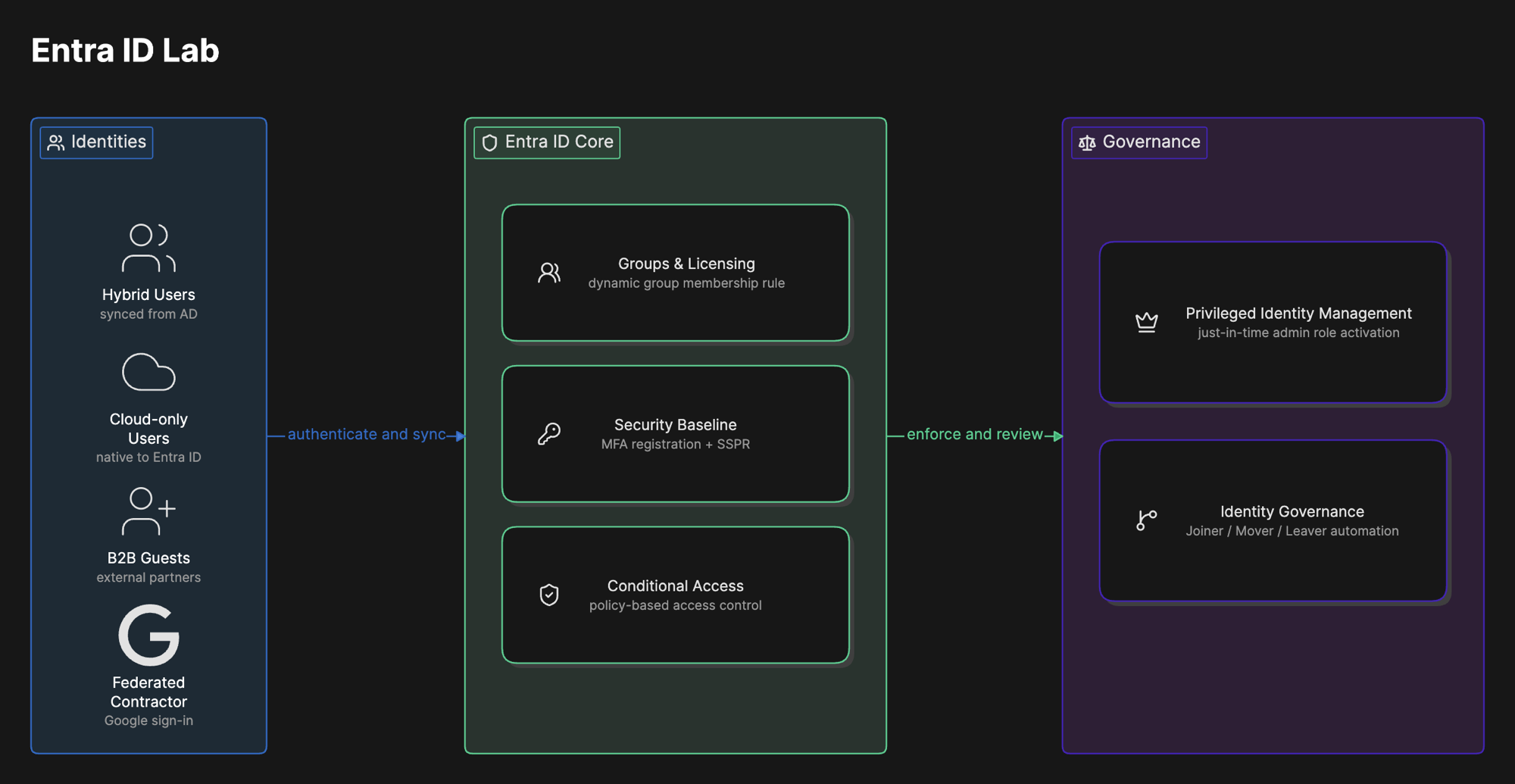
Extends the Active Directory Lab into a full hybrid identity environment in Microsoft Entra ID, covering the four pillars of Microsoft's SC-300 exam: identity management, authentication and access management, application access management, and Identity Governance. On-premises AD users sync in through Entra Connect, and new cloud-only users, external guests, and a federated identity provider round out a realistic mix of the identity types a real tenant actually has to manage.
Eleven phases are complete, each documented on its own page below. Several more phases (enterprise app SCIM, a Salesforce integration, Azure VM and Key Vault work, Defender for Cloud Apps, Microsoft Sentinel) are still on the roadmap, which is why this project carries an in progress status rather than complete.
Why
Why it matters
Most companies are not purely cloud or purely on-premises. They are somewhere in between, syncing an existing Active Directory into the cloud while also onboarding new hires directly in the cloud and letting contractors sign in with accounts the company does not manage. Getting that mix right, and controlling access consistently across all of it, is most of what an IAM or Identity Governance role actually is day to day.
This project builds that mix on purpose: hybrid users synced from AD, cloud-only staff, external B2B guests, and a federated identity provider for contractors, then layers real controls on top, risk-based Conditional Access, just-in-time admin access through PIM, and governance workflows that provision and deprovision access automatically instead of by hand.
Phases
Built in 11 phases
Each phase is documented on its own page, the same way it is broken out in the GitHub repository, with real screenshots, what went wrong, and what I learned.
Hybrid Identity Review
CompleteConfirmed how users synced from on-premises Active Directory actually behave in the cloud, and which attributes become read-only once a user is hybrid.
Cloud Users and B2B Collaboration
CompleteCreated a cloud-only internal identity and invited an external B2B guest to show the real difference in who owns the credential and the lifecycle.
Groups and Licensing
CompleteBuilt all eight security groups mapped to real departments and configured group-based licensing so a Microsoft 365 license is assigned automatically through group membership.
Dynamic Groups
CompleteBuilt a dynamic security group with an attribute-based membership rule to prove group membership can update itself without any admin action.
Tenant Properties and Roles
CompleteConfigured tenant-level properties and assigned admin roles by least privilege instead of defaulting anyone to Global Administrator.
Federated Identity Provider
CompleteConfigured Google as a federated identity provider so an external contractor can sign in with credentials this organization never has to manage.
Security Baseline: MFA and SSPR
CompleteTightened Smart Lockout, rolled out MFA registration tenant-wide, and enabled self-service password reset, which is where a real hybrid identity gap first surfaced.
Conditional Access
CompleteRolled out three Conditional Access policies enforcing MFA, blocking legacy authentication, and responding automatically to risky sign-ins, which is what exposed a hybrid identity gap dating back to the original Active Directory build.
Privileged Identity Management
CompleteConverted Global Administrator from a permanent, always-on assignment to an eligible role that requires just-in-time activation through PIM.
Conditional Access Strategy Document
CompleteWrote the Phase 8 Conditional Access rollout up as a strategy document aimed at a security lead, and validated enforcement with real sign-in log evidence.
Identity Governance and JML
CompleteBuilt entitlement management, Terms of Use, external user lifecycle controls, and Joiner, Mover, Leaver automation, then proved the access package pattern under a real, deliberate failure.
What went wrong
Honest account
Turning on Conditional Access in Phase 8 is what actually exposed a hybrid identity gap that had been sitting quietly since the Active Directory Lab. Hybrid users started failing sign-in with error 53003 once MFA enforcement went live, while the cloud-only test user was unaffected. The root cause traced back to the Entra Connect setup in that earlier project, where Password Hash Synchronization never actually got enabled. The fix, detailed on the Phase 8 page below, was giving the domain controller real internet access, re-running Entra Connect with Password Hash Sync and Password Writeback explicitly turned on, and forcing a full sync cycle.
The same missing writeback configuration also broke self-service password reset for hybrid users specifically, surfacing first during Phase 7. It is the same underlying gap showing up in two different features, a reminder that a configuration problem in one phase does not always show its full cost until a later phase depends on it.
What I learned
Takeaways
The Entra Connect gap connects three phases of this project (SSPR, Conditional Access, and the original Active Directory build) into one lesson. Identity infrastructure problems compound. A configuration gap that looks harmless in isolation can break two unrelated features once enough of the environment depends on it, and by the time it surfaces, it is not always obvious where it actually came from without tracing back through what was configured earlier.
Writing the Conditional Access strategy document also changed how I think about this work. Configuring a policy correctly, and being able to explain why it exists, what it protects against, and what could break because of it to someone who is not going to read the Entra admin center, are two different skills. Both matter, but the second one is the part that actually gets a security decision approved.