Phase 10 of 11
Conditional Access Strategy Document
Overview
What was built
Configuring a Conditional Access policy correctly and being able to explain why it exists, what it protects against, and what could break because of it, to someone who is never going to open the Entra admin center, are two different skills. This document exists to practice the second one: an executive summary, a plain-English breakdown of each policy's purpose and business impact, and a recommended next-steps list for moving toward stricter enforcement safely.
How it works
The walkthrough
Step 1 of 1
Confirming enforcement with sign-in log evidence
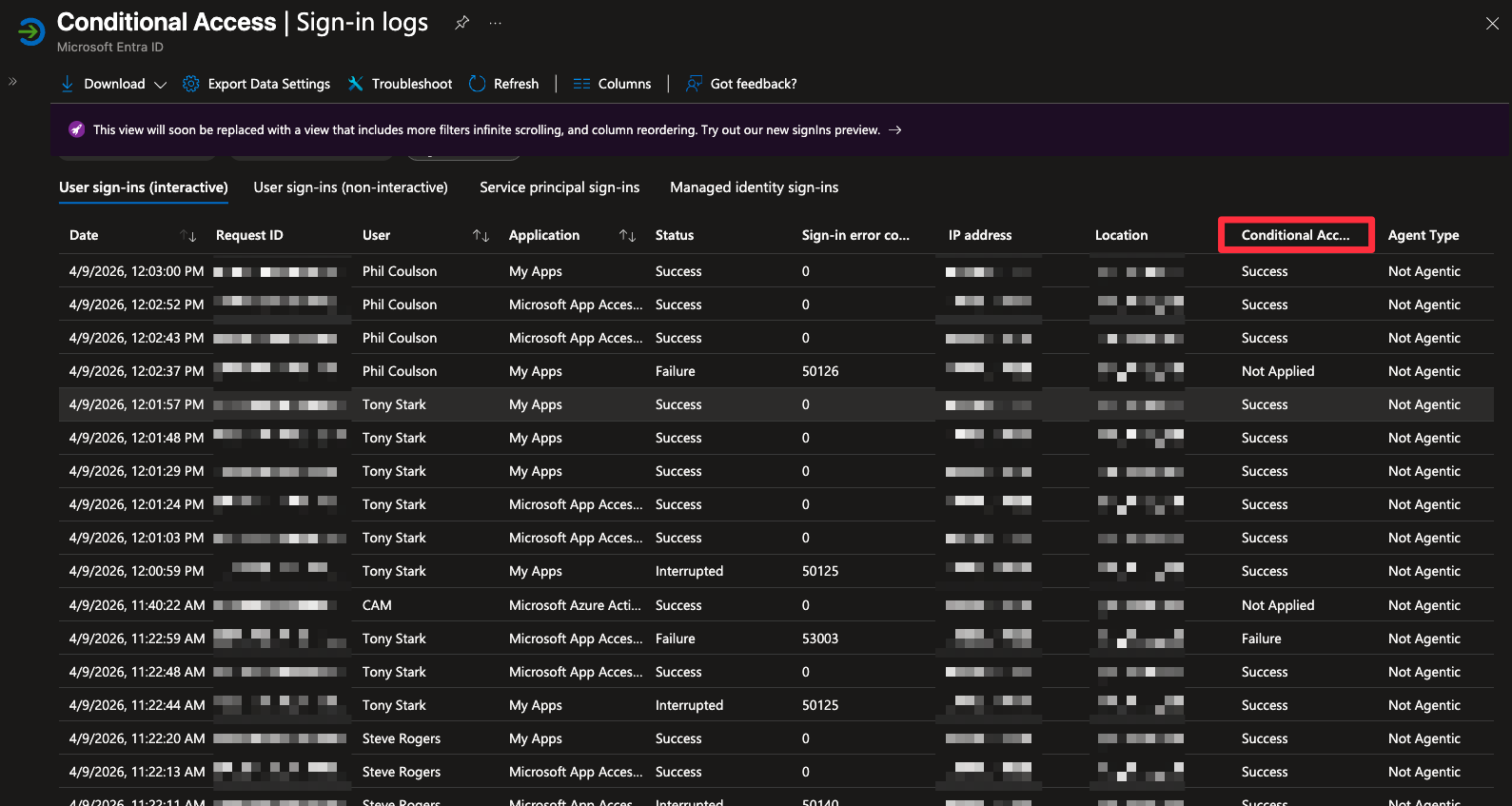
Rather than taking a policy's configuration screen at its word, pulled real sign-in logs for Tony Stark and Phil Coulson, both hybrid users, and Steve Rogers, a cloud-only user, all showing successful authentication to MyApps with Conditional Access reporting Success.
The document also names a real gap as a future enhancement rather than pretending it is solved: a policy requiring a compliant device for privileged role activation, which depends on Microsoft Intune device management being configured first, something this lab environment does not yet have.
What I learned
Takeaways
Recommending a Report-only period before full enforcement, and reviewing policies quarterly against real sign-in log data instead of leaving them untouched once turned on, are the kind of operational details that separate a policy that was configured once from a program that is actually being run.