Phase 5 of 11
Tenant Properties and Roles
Overview
What was built
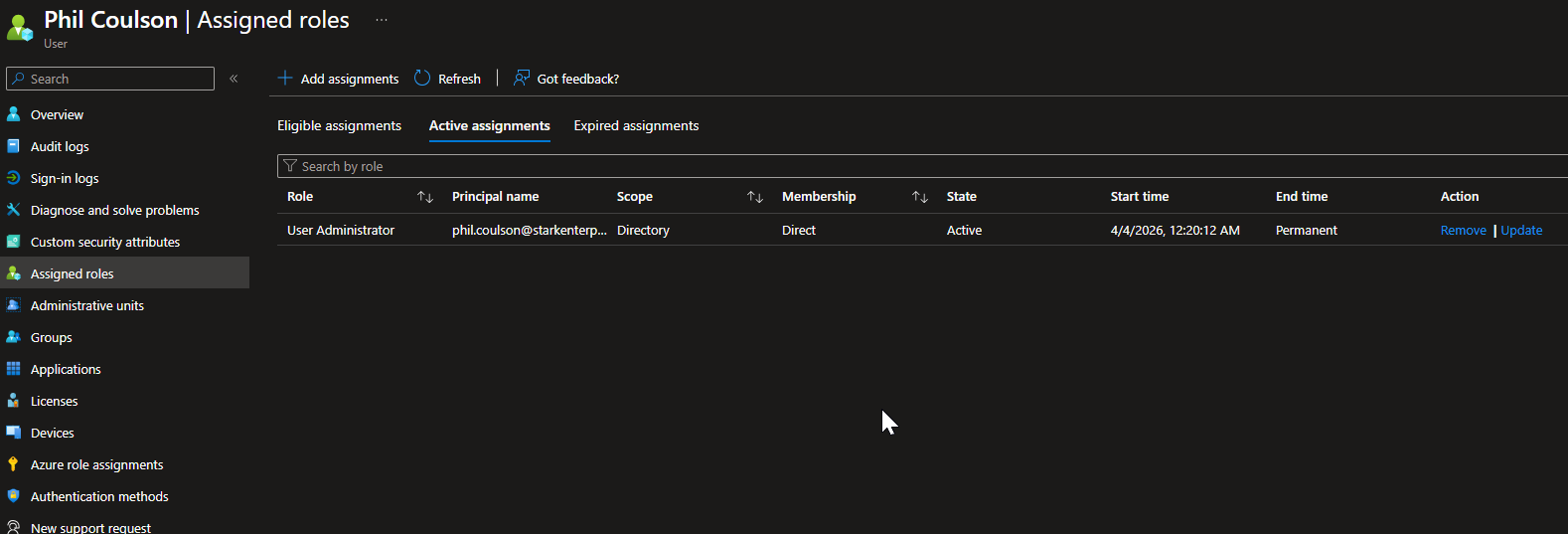
Phil Coulson, the IT Manager, needs to manage user accounts and groups, nothing more, so he was assigned User Administrator rather than Global Administrator, which would also hand him control over billing, security policies, and app registrations that his role never requires. Nick Fury, the Security Manager, needs visibility into security events, so he was assigned Security Reader, a read-only role, rather than Security Administrator, which would let him modify security policies he only needs to observe.
How it works
The walkthrough
Step 1 of 1
Assigning roles by job function, not convenience
Set the tenant display name to Stark Enterprise Lab and configured the technical and privacy contact fields under tenant properties.
Assigned both roles as Active rather than Eligible, to demonstrate straightforward least-privilege role assignment in this phase. Eligible assignments with PIM's just-in-time activation are covered separately and fully in Phase 9, once the eligible-versus-active distinction actually matters for a privileged role like Global Administrator.