Project 8
Risk-Based Conditional Access with Identity Protection
Architecture
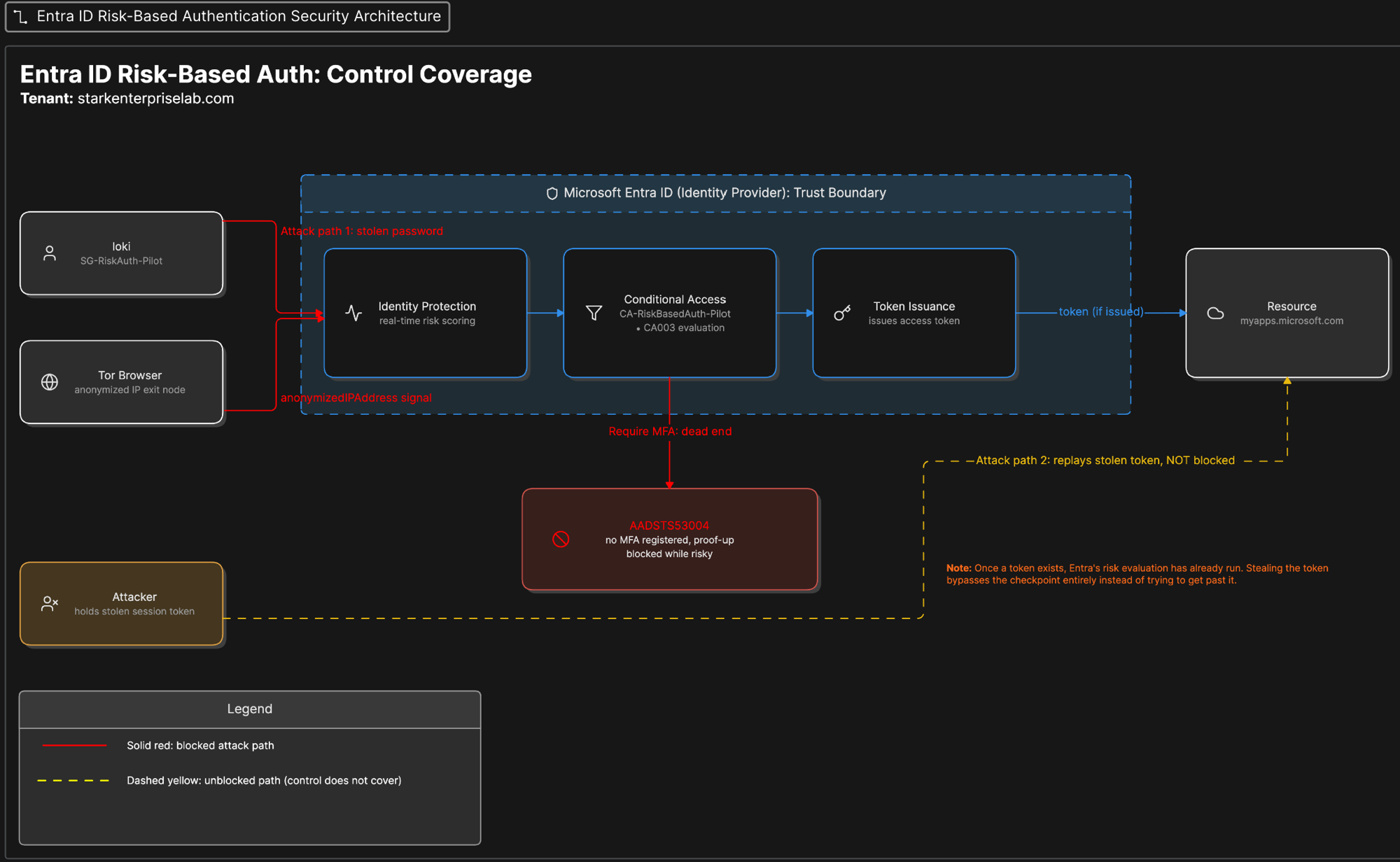
Overview
What was built
Built a risk-based Conditional Access policy scoped to a single pilot group, tested it in Report-only against a real risk signal, then switched it on. Triggered a genuine risk detection using Microsoft's own documented method, signing in through the Tor Browser, and investigated the flagged account using the Microsoft Graph PowerShell SDK instead of the portal. This is the first project in this portfolio where Graph PowerShell was actually connected and run against a live tenant, not shown side by side with a portal screenshot as a comparison.
Clearing the flagged risk through PowerShell looked like it worked and didn't. A second sign-in, from a completely different network, produced a second, independent real block. Tracing why, and finding the admin action that actually restored access, turned into the most useful part of the project.
Why
Why it matters
A static MFA policy treats every sign-in the same, whether it comes from a known laptop on a known network or an anonymized exit node nobody has ever seen. That's expensive in the wrong direction: it adds friction to every normal sign-in equally and does nothing extra for the sign-ins that actually look dangerous. Microsoft Entra ID Protection scores each sign-in for risk and lets Conditional Access step up enforcement only when the score justifies it.
The narrow skill this project proves is the one most writeups skip: not just turning a risk policy on, but knowing the difference between suppressing an alert and actually fixing the account behind it. Dismissing a risky user and remediating one look identical in the portal and are not the same action. Getting that distinction wrong in a real environment leaves a compromised account looking clean while it's still compromised.
How it works
The walkthrough
Step 1 of 9
Build the policy in Report-only
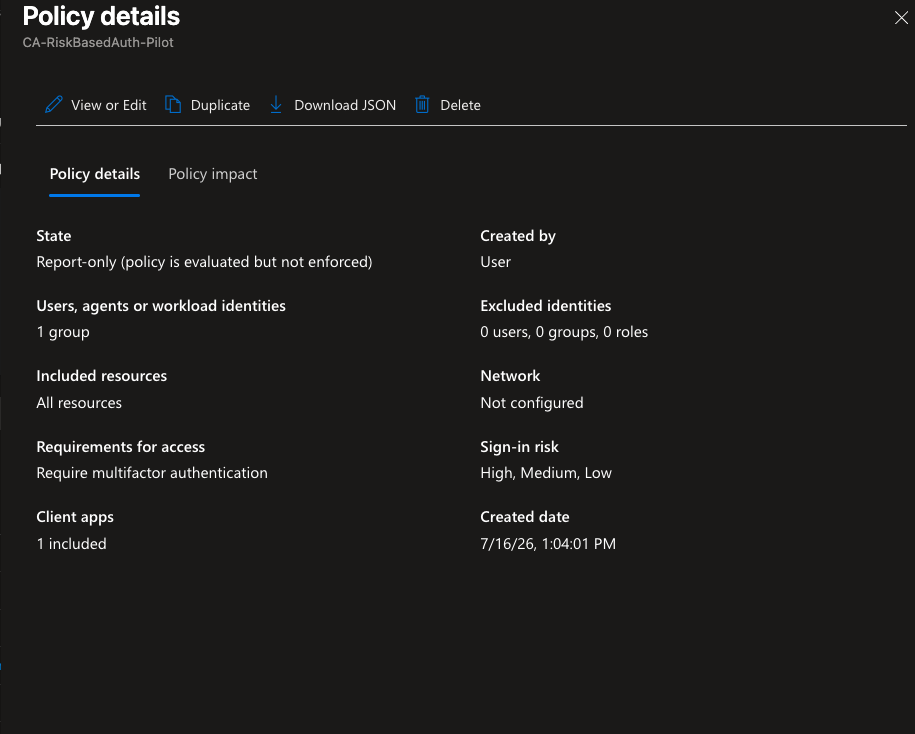
Created a security group, SG-RiskAuth-Pilot, containing one test account, so the blast radius of a new risk-based policy stayed contained to a single identity while it was being proven out. Built the policy with sign-in risk (Low, Medium, High) as the condition and Require multifactor authentication as the grant, scoped only to that group, enabled in Report-only so it would evaluate against real traffic without enforcing anything yet.
Step 2 of 9
Trigger a real risk detection
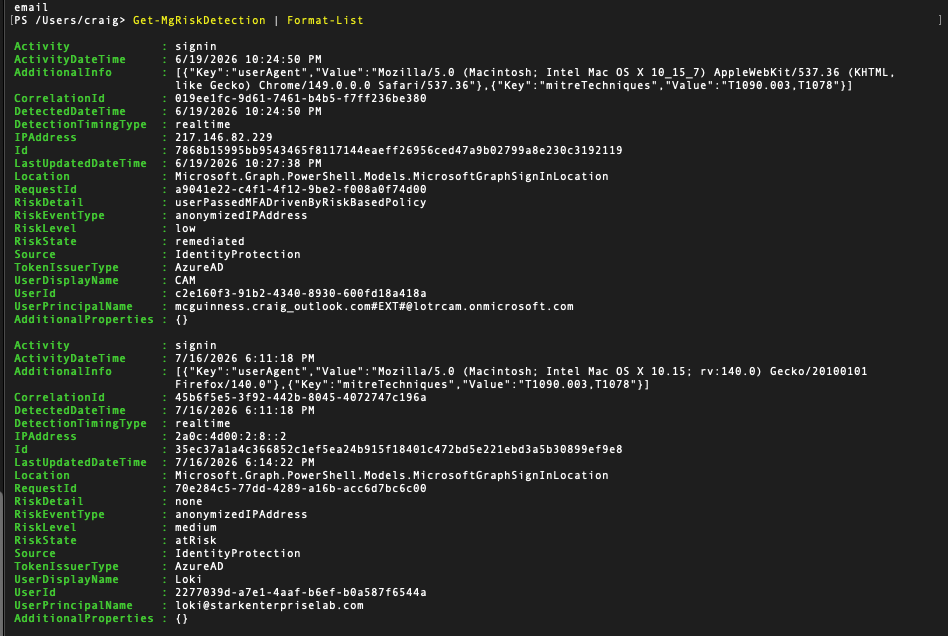
Used Microsoft's own documented method for generating a genuine anonymized-IP detection: signed in as the test account through the Tor Browser. This isn't a simulated signal, Identity Protection flags Tor exit nodes through real threat intelligence, so the detection that came back was real.
Step 3 of 9
Hit the first real block
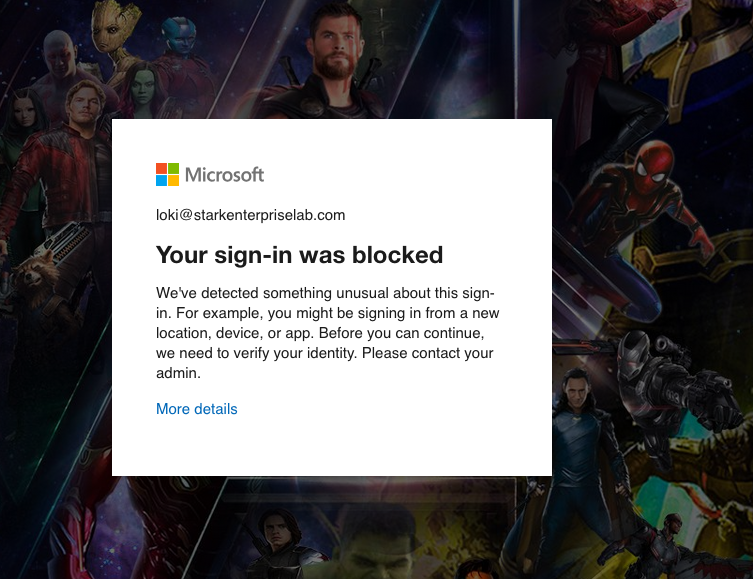
The sign-in was blocked outright, with a real error shown directly to the user: "Your sign-in was blocked. We've detected something unusual about this sign-in." The sign-in log confirmed the exact code, AADSTS53004.
Step 4 of 9
Trace the root cause instead of assuming it
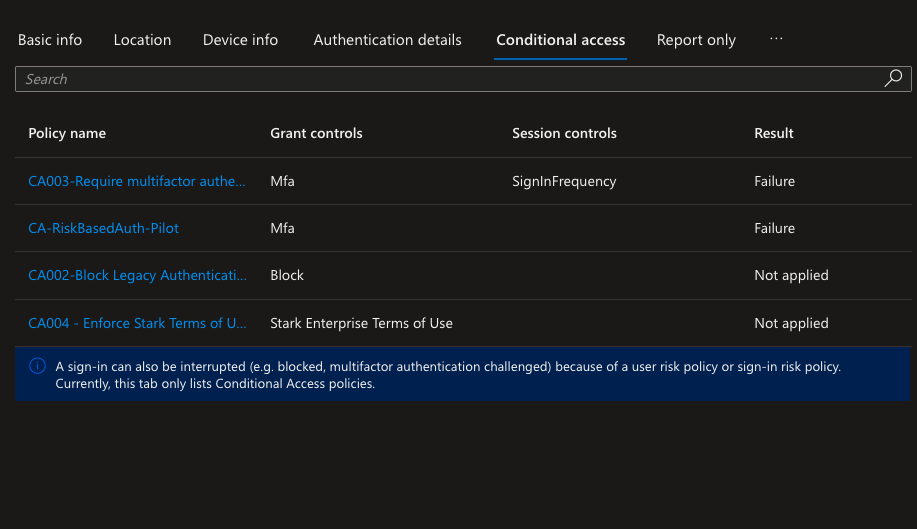
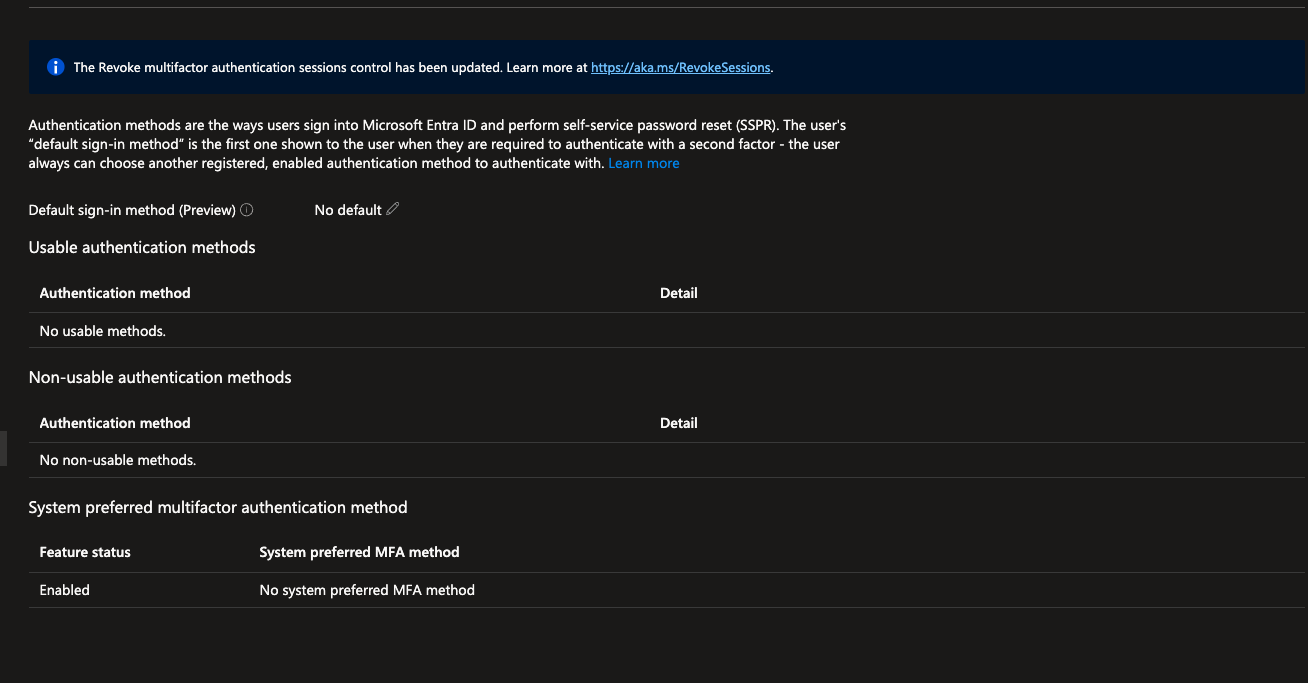
Checked the sign-in log's Conditional Access tab rather than assuming the new policy caused the block. It hadn't. The new policy was still in Report-only and had merely observed. The actual block came from a pre-existing policy, CA003, that had been in the tenant all along, already enforcing, with a sign-in risk condition nobody had tested against real traffic before this project. The test account had zero MFA methods registered, and Entra won't let a risky account register a new MFA method mid-session, so it had no way to satisfy the grant control and got blocked outright.
Step 5 of 9
Query the real risk state through Graph PowerShell
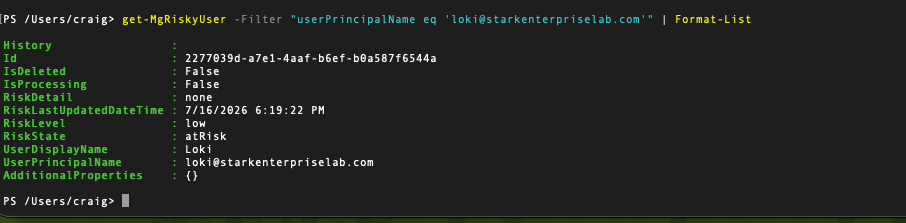
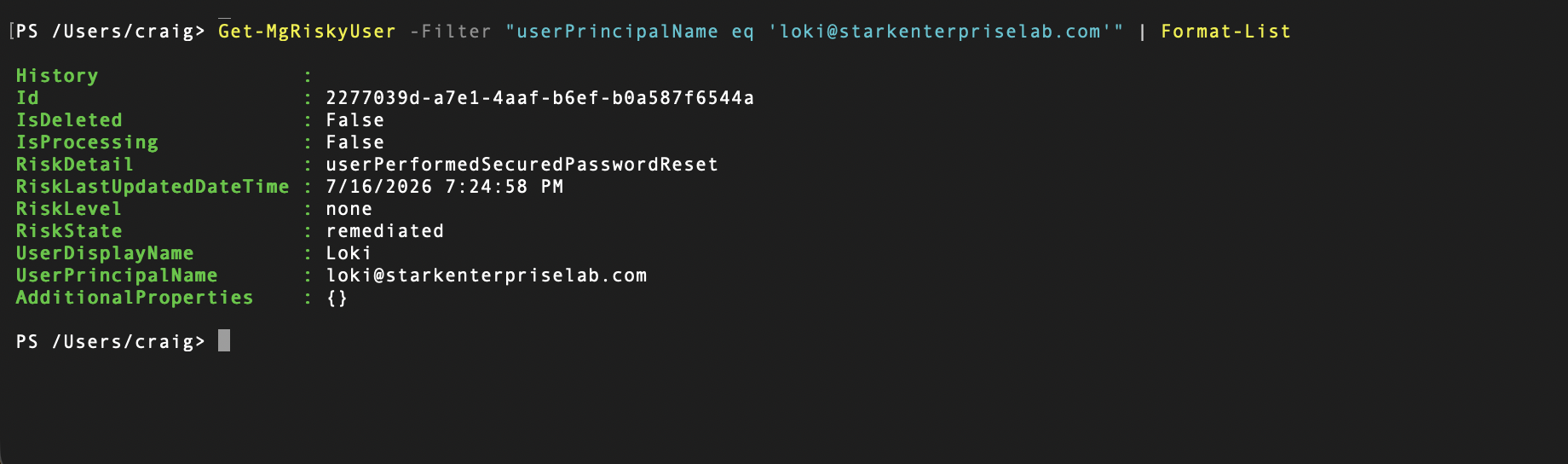
Installed and connected the Microsoft Graph PowerShell SDK with least-privilege delegated scopes, IdentityRiskyUser.ReadWrite.All and IdentityRiskEvent.Read.All, not the full Graph module. Queried the aggregated risky-user record and confirmed RiskState: atRisk.
Step 6 of 9
Dismiss the risk, and watch it not fix anything
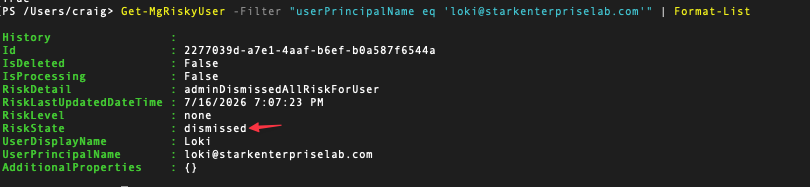
Ran Invoke-MgDismissRiskyUser, which returned True and updated the record to RiskState: dismissed. That read as success. It wasn't. A second sign-in attempt, from a different, non-Tor network, produced a second, independent real AADSTS53004 block, this time with both CA003 and the new CA-RiskBasedAuth-Pilot policy (now switched on) showing Failure in the sign-in log, confirming the new policy was genuinely enforcing on its own.
Step 7 of 9
Find out why dismiss could never have worked
The account had zero MFA methods registered. Dismissing a risk clears the flag for reporting purposes; it doesn't touch whatever made the account risky or unable to self-remediate in the first place. Any fresh risky sign-in from any network was going to hit the identical wall, because the actual cause was never addressed.
Step 8 of 9
Apply the fix that actually works
The correct admin action for an account with no way to self-remediate is a temporary password reset, done from the Users blade, not a dismiss through the risk record. Reset the password, signed in with the temporary one, was forced to set a new permanent password, and landed on the target resource successfully. Confirmed through Graph PowerShell: RiskState: Remediated.
Step 9 of 9
Confirm detection in Log Analytics
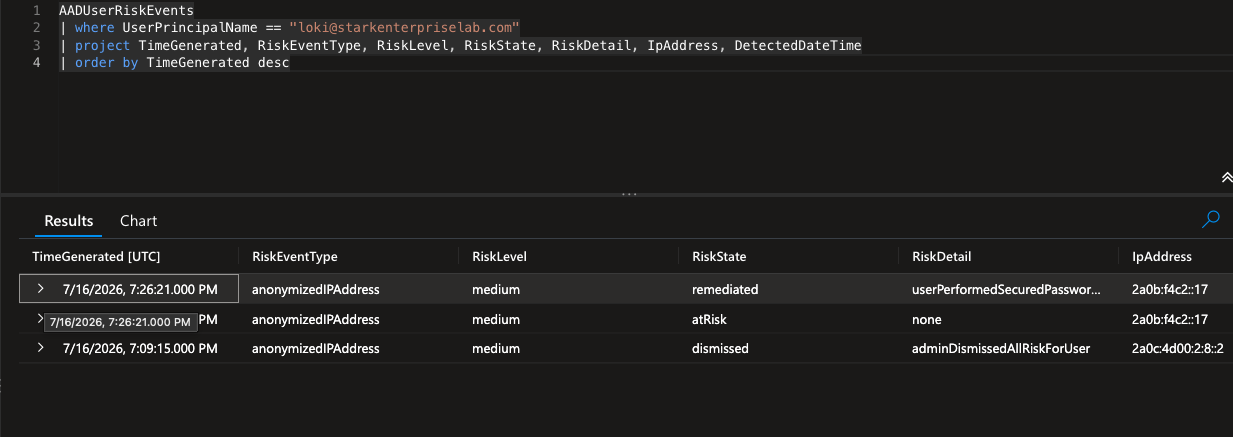
Extended the existing Log Analytics workspace with two new diagnostic categories, UserRiskEvents and RiskyUsers, and wrote KQL against both resulting tables to confirm the same story shows up in logs a SOC analyst would actually query: the detection, the dismiss, the re-detection, and the remediation, in order.
What went wrong
Honest account
The plan was one clean cycle: switch the new policy on, trigger a block once, dismiss the risk through PowerShell, confirm access restored. What actually happened was messier. The first block came from a policy I hadn't built and didn't know had a risk condition on it, CA003, discovered by reading the sign-in log's Conditional Access tab instead of assuming which policy was responsible.
Dismissing the risk through Graph PowerShell returned True and updated the record cleanly, and it did not restore access. A second sign-in, from a normal network, produced a second, independent real AADSTS53004 block, with both CA003 and the new pilot policy showing Failure in the log. Dismiss clears a flag for reporting purposes. It doesn't touch whatever made the account risky, or unable to self-remediate, in the first place.
The actual fix was an admin-generated temporary password from the Users blade, not anything available through the risk-dismissal cmdlets. Even after that fix succeeded and the record showed RiskState: Remediated, the RiskDetail label it produced, userPerformedSecuredPasswordReset, is documented by Microsoft as describing a user-initiated action. The action taken was an admin resetting the password, which Microsoft's own documentation says should produce a different, distinct label. That mismatch is still open and hasn't been fully resolved.
What I learned
Takeaways
Dismissing a risky user and remediating one are not the same action, and the portal doesn't make that obvious. An account with no MFA method registered can only be fixed by an admin, because Entra deliberately won't let a risky account register a new MFA method mid-session. If it did, an attacker holding a stolen password could register their own device and lock the real user out permanently, so the block that initially looked like an obstacle turned out to be the actual security mechanism working as designed.
Self-service remediation, a user clearing their own risk by completing a step-up MFA prompt, was never actually exercised here, since the test account had no MFA method to register. Only the admin-forced path was proven. A test account with at least one registered MFA method would let that more common path get validated for real, and that's the next thing to build rather than something finished here. There's also no alert wired to the KQL queries yet, so right now the only way to find a flagged account is to run them by hand.